Showing posts with label SAP CRM overview. Show all posts

Monday, 6 November 2017

SAP CRM Training | SAP CRM Architecture Overview introduction

SAP CRM consists of various components that allow you to integrate the CRM module with other SAP and non-SAP modules, internet, mobile devices like smartphones, tablets, and enterprise portal.
In the centre, it has SAP CRM server which has sub components like:
CRM enterprise functions: Data is exchanged between the CRM system and a connected ERP system (minimum SAP R/3 Release. The SAP Business Information Warehouse (SAP BW training) is used as a data source for parts of the SAP CRM solution, and also contains data for consolidation and analysis.
As of SAP ECC 6.0, the plug-in will be contained directly in SAP ECC. Until SAP ECC 6.0 the plug-in is delivered separately and has to be installed.
CRM middleware: The SAP CRM solution supports the handling of CRM business objects (such as customers and prospects, activities and opportunities, and products and product catalogs) in a variety of application components including Internet Sales, Service Interaction Centre, Telesales and Campaign Management. Some of these components require external extensions for communication and integration. These components will be described in more detail in later sections.
The middleware layer supports the controlled data exchange with other systems such as mobile clients, back-end systems, and data ware houses. A replication procedure guarantees consistent and up-to-date data in the distributed local databases, especially for mobile users. Message queuing ensures data delivery and processing.
Then there are adapters to communicate with hand held devices and internet. The SAP ECC/R3 system is used for backend, SAP BI system (learn from SAP BI training by SAP Trainings Online) is used for analytical reporting and SAP SCM is used to enhance the capabilities of SAP CRM module.
There are different software layers in the framework architecture of SAP CRM. The thing with these software layers is that they are all separated from each other. The reason for this separation is to facilitate the connection of various business applications. In fact, these connections are made possible via generic interaction layer (genIL) and business object layer (BOL) to the CRM User Interface Framework (or the Presentation Layer).
We shall now look into different layers that make up for the SAP CRM Architecture:
Presentation layer: The CRM User Interface Framework or CRM UIF forms the basis of the Presentation Layer which in turn is responsible for running HTML pages in the web browser. BSP’s Presentation is not responsible for controlling the business logic of CRM Business Objects and process as it will be taken care of separately.
Business layer: The Business Layer itself comprises of two software layers:
1.BOL (business object layer): As the name suggests, the Business object layer is responsible for saving the business object data. For example, this could include but not limited to business partners, transactions, and products. This layer in a way ensures the separation of the underlying logic of business and the CRM WebClient UI.
2.GENIL (Generic Interaction layer): The genIL or the Generic interaction layer is responsible for handling the data transfer from the Business object layer to the APIs or Application programming interfaces of the concerned business engine.
It is important to note here that both the above layers are strictly separated from each other. It is because of this separation, business applications can be connected to the CRM WebClient UI or the Presentation Layer via Business object layer (BOL) and GENIL (Generic Interaction layer). Remember, it is not just the CRM business objects and processes that the CRM WebClient UI handles, but also application objects of ERP system, like SAP Supply Chain Management’s ERP sales orders and SAP Human Capital Management’s employees.
Business Application: The business application comprises of the database tables and the business logic.
SAP CRM Server
SAP CRM Server is linked to ERP system which can either be any ERP software or SAP ECC systems that the organization uses. The entire SAP CRM system will act like a logical box that can be used for connecting a variety of systems, including:
  • SAP BI/BW for the purpose of reporting.
  • CRM Servers can also be connected to SAP ERP systems, SAP APO, SAP BI, SAP Solution Manager, SAP CRM, and other SAP Net-ware portals.
  • SAP CRM servers can also be connected to the Interaction Centre, websites (or web channels), and mobile devices (or handhelds).
About SAP CRM training
SAP Trainings Online provides best SAP CRM training with our training learners can become expert in concepts like Organization Management, Account Management, Territory Management, Product Master data, Transaction processing, Lead Management, Opportunity Management, Quotation Management, Order Management, Contract Management, Activity Management and Visit Planning.etc.
Want a free demo on SAP CRM Click Here to register for live video class
For more details visit: www.saptrainingsonline.com
Email: contact@saptrainingsonline.com
Contact: INDIA +91 9052775398 USA +13152825809

Wednesday, 25 October 2017

Learn SAP CRM Online : How Does SAP CRM Application Works and its benefits ?

Overview
CRM software allows a business to manage all the organizations interactions with customers and potential customers. The CRM typically involves a marketing automation platform, sales tracking software and contact management for customer service/technical support. A CRM is a very useful and powerful tool that should be utilized to improve business in almost all levels. Learn more about CRM and its offerings from SAP CRM training by SAP Trainings Online.
Customer Relationship Management is the method of managing the customer relationship between the company and the clients by doing the following terms like meetings, appointments, phone numbers, call log, addresses, etc., CRM stores private information of the sales, leads for the customers.
How SAP CRM WORKS?
A successful CRM works by allowing you to enter your contacts quickly from any device and anywhere in the world. Once the contact is entered into your online CRM software, you can create tasks and reminders to follow-up with them on a regular basis. After you speak to them, you can log the phone call and write notes about what was discussed. When it comes time to discussing the price, you can send an estimate and then an invoice if it’s been approved. The customer will receive an email with a link to pay you directly by credit card. After you’ve been paid, you can increase your revenue by sending automatic email campaigns to increase the percentage of return customers. Easy, simple, and fast the Panther way!
ROI of CRM
A huge advantage CRM does for you is it gives you Return on Investment (ROI). Of course, ROI is not everything but it is definitely a huge statistic to keep in mind. A multipurpose CRM offers various options to utilize and will allow you to eliminate the need for multiple applications.
CRM creates a unique consumer experience and enables to address various business processes in order to improve wide range of sales, services and marketing situations. SAP SD is the module which is into complete sales process. Learn SAP SD training by unique training platform with 12+ years of experienced faculty.
Sales force automation service
Core of this software is prospect relationship management (PRM) solutions which often cut out the active sales process altogether by offering to track customer behavior and nurture them from first contact to sales, this software can track the web activity and help to develop better relationship with client and close more sales.
Sales force automation software track the calls made to the prospect and the response is recorded for future use. SFA also offers a feature called contact management system for tracking and recording every stage in the sales process for each prospective client, from initial contact to final disposition, and hence reduce the number of sales people required in handling a customer.
Invoicing and billing software system
Whether the customer buys online or offline, billing and invoicing is very important step in sales process both for customer and buyer. This system helps to maintain accounts and balance sheets in a good shape.
And features includes various options like custom invoices which can be schedule based on billing cycle of clients, uses product database while creating bills and shows you the stock remaining. This also keeps track of pending and overdue invoices and alert you accordingly. You can add various tax rules that applies to your specific business and location and will be added to all invoices. Various discounts offered can be added on each item and the total bill and calculates are automatically done by software. This software records method of payment date and time of each customer.
Customer service and support
This is very important step in maintaining healthy relationship with the old customers by giving the support for the product/service you sold them and motivate repurchases. Many a times people reject a product based on bad customer support.
Example of this is automated caller service which redirects you the expert who will be able to do best solve the problem. The software keeps track of problem raised and solution provided and has feature to escalate it to the senior management in case of unresolved issues. This software can also help in rewarding loyal customers by loyality program and redemption points.
Uses of CRM
Enterprises use CRM to collect and manage data regarding their customers.
Using a CRM, the business may apply such data to:
  • Target specific marketing campaigns to specific customers based on their preference.
  • View and manage contact information to serve prospects and customers better.
  • Offer services such as product tracking and real time quotes.
  • Follow up or respond through email, social media, telephone or any other media.
  • Manage tasks related to customers, such as generating invoices, sending reminder emails and more.
  • Track performance of sales and marketing executives vis a vis their customers.
  • Process all data and information related to the customer as analytics, to gain real-time visibility.
About SAP CRM Training
SAP Trainings Online gives you the SAP training in all modules and offers more than just going through of the curriculum. Our content covers all the major areas that are necessary for understanding SAP CRM and also focus on practical oriented real time based implementation. In this course one will come to have idea of how to handle large volumes of data when it comes to customer management and leads to an understanding of how to manage customer relations from a back end point of view.
Want a demo on SAP CRM enroll with us for free live demo at: www.saptrainingsonline.com/student-registration
For more details visit: www.saptrainingsonline.com
Email: contact@saptrainingsonline.com
Contact: India +91 9052775398 USA +13152825809

Sunday, 22 October 2017

Learn SAP CRM Online | Overview of SAP CRM Application Working

How Does CRM Application Works
Overview
The SAP CRM application is an integrated customer relationship management (Learn SAP CRM training) software manufactured by SAP SE that targets business software requirements of midsize and large organizations in all industries and sectors.
Customer Relationship Management is the method of managing the customer relationship between the company and the clients by doing the following terms like meetings, appointments, phone numbers, call log, addresses, etc., CRM stores private information of the sales, leads for the customers.
Essentially, CRM works by collecting leads or consumer information, analyzing the collected information to understand customer or market requirements and adjusting marketing campaigns accordingly to increase sales.
CRM also serves customer service and support divisions--making businesses efficient and improving customer satisfaction.
In any business, the bottom-line of CRM work flow is to:
  • Initiate Marketing
  • Process Sales
  • Schedule Orders and
  • Provide Support
How does CRM software works?
Take every business, they need profit in their sales. Some of the business gets a failure in their sales. Why is it causing? It is causing because lack of maintaining the customers and sales.
Do you know how CRM application works? At first, know the customer’s needs; contact the people who need your product. Yet, as your business grows, these business connections grow more sophisticated. It just not a transaction between the seller and buyer.Sales Force is the best suitable CRM for large established businesses and Zoho is the best CRM for growing or small-scale businesses.
You start to manage many connections, across time. You need to share data with teams in your own organization who are making contact with the same clients. A CRM system can serve an important role to manage the infinite connections to improve the business. How do you manage the many data coming in from sales, service and marketing audit into actionable organization information?
A CRM application can give the success to everyone across the business, including sales, marketing, customer service, development for business, manage the relationship and communication. We can easily access and visible the customer data such as meetings, appointments, phone numbers, call log, addresses, sales opportunities, service issues.
A CRM system can give the clear overview of your customers.
CRM is easy to use, customer friendly dashboard; you see everything of the customer in one place.
Learn SAP CRM from world’s biggest unique SAP training resource SAP Trainings Online by 12+ years of experienced faculty.
SAP Trainings Online provides best SAP CRM training with our training learners can become expert in concepts like Organization Management, Account Management, Territory Management, Product Master data, Transaction processing, Lead Management, Opportunity Management, Quotation Management, Order Management, Contract Management, Activity Management and Visit Planning.etc.
Want a free demo on SAP CRM Click Here to register for live video class
For more details visit: www.saptrainingsonline.com
Email: contact@saptrainingsonline.com
Contact: India +91 9052775398 USA +13152825809
Friday, 20 October 2017

An Introduction to Different Types of CRM Systems | SAP CRM e-learning

CRM is software that helps businesses automate repetitive processes for efficiency, track customer data, and boost customer satisfaction. In the past, global marketers have shifted from sellers to customers. Today, customers are more powerful than sellers, if we consider the driving factors of market. We have different types of CRM according to the changes in customer portfolios, speed of business operations, requirement of handling large data, and the need of sharing information, resources, and efforts jointly.
CRM systems are divided based on their prominent characteristics. There are four basic types of CRM systems: (Learn more from SAP CRM training by experts).
  • Strategic CRM
  • Operational CRM
  • Analytical CRM
  • Collaborative CRM
Strategic CRM
Strategic CRM is a type of CRM in which the business puts the customers first. It collects, segregates, and applies information about customers and market trends to come up with better value proposition for the customer.
The business considers the customers’ voice important for its survival. In contrast to Product-Centric CRM (where the business assumes customer requirements and focuses on developing the product that may sometimes lead to over-engineering), here the business constantly keeps learning about the customer requirements and adapting to them.
These businesses know the buying behavior of the customer that happy customers buy more frequently than rest of the customers. If any business is not considering this type of CRM, then it risks losing the market share to those businesses, which excel at strategic CRM.
Operational CRM
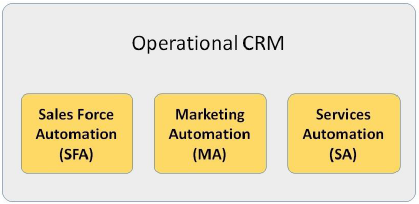
Operational CRM centralizes the business process, includes Sales, Marketing and Service automation. The main objective of this kind of CRM is to generate leads, change them into contacts, hold all required details and offer service throughout the life cycle.
Salesforce is the best suitable CRM for large established businesses and Zoho is the best CRM for growing or small-scale businesses
Collaborative CRM
Collaborative CRM is otherwise called as Strategic CRM, which enables an organization to distribute customer data among various business units like the sales team, finance team, marketing team, service team and support team. The purpose of collaboration is to uplift the quality of service and customer satisfaction.
Collaborative CRM benefits are as follows:
  • Recognizes customer service payment reduction opportunities.
  • Combines data to create an improved customer service overview
  • Promotes customer channel communication
Collaborative CRM enables smooth communication and transactions among businesses. Though traditional ways such as air mail, telephone, and fax are used in communication, collaborative CRM employs new communication systems such as chat rooms, web forums, Voice over Internet Protocol (VoIP), and Electronic Data Interchange (EDI).

There are collaborative CRMs with in-built Partner Relationship Management (PRM) software application which helps in managing partner promotions. SugarCRM is a popular collaborative CRM. It enables expert collaboration and provides state-of-the-art social capabilities.
Analytical CRM
Analytical CRM helps management, marketing, sales and support organization to determine the desirable way to serve their customers. Data analysis is the major function of this type of SAP CRM applications. It examines customer information, coming from various touch points, to get valid insights about the current status of an organization. It helps management to take the honorable decision, marketing executives to know the campaign effectiveness, sales administrators to increase sales and support organization to improve quality of support and build the strong customer relationship.
Analytical CRM can set different selling approaches to different customer segments. In addition, different content and styling can be offered to different customer segments. For the customers, analytical CRM gives customized and timely solutions to the problems. For the business, it gives more prospects for sales, and customer acquisition and retention.
Learn SAP CRM
SAP Trainings Online provides best SAP training with our training learners can become expert in CRM concepts like Organization Management, Account Management, Territory Management, Product Master data, Transaction processing, Lead Management, Opportunity Management, Quotation Management, Order Management, Contract Management, Activity Management and Visit Planning.etc.
Interested to take SAP CRM demo CLICK HERE for free live demo
For more training options visit: www.saptrainingsonline.com
Email: contact@saptrainingsonline.com
Contact: India +91 9052775398 USA +13152825809

Learn SAP CRM Online | Why SAP CRM is Needed?

CRM stands for “Customer Relationship Management” and is a set of methodologies and tools that helps to manage customer relationship in ...